Showing posts with label Launcher. Show all posts

Tuesday, June 9, 2015

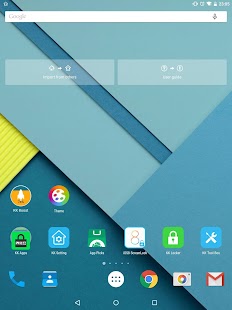
M Launcher - Android M Launcher Premium v1.3

M Launcher -Android M Launcher apkmania
M Launcher - Android M Launcher Premium v1.3
Requirements: 4.0+
Overview: M Launcher is a well polished, highly customizable Lollipop + Android M style launcher;
M Launcher - Android M Launcher Premium v1.3M Launcher - Android M Launcher Premium v1.3
M Launcher is Fast, Cool, Powerful, bring you the latest Android 5.0 Lollipop and Android M(Android 6.0) launcher experience!
★ M Launcher Main Features:
M Launcher is based on the latest Android launcher, support for Android 4.0+ devices
Highly customizable:
- Support icon theme, compatible with 5000+ third-party icon packs; Many live wallpapers and cloud based wallpapers
- Able to change launcher desktop and drawer grid size, lock desktop, etc
- 4 UI Size Mode, easy to change the icon size
- 4 drawer style: horizontal, vertical, vertical with category, list style
- 12 desktop and drawer transition effect;
There are about 200+ options to customize launcher to what you like, make your launcher personalized
Handy Sidebar:
It include handy features, such as cleaner, toggle, torch, favorite apps and more;
And you can drag-out Sidebar from anywhere
Powerful Drawer:
Features to hide app, create folders, sort app and more;
And drawer has Quick A-Z bar to help to quickly locate app; it also support multi groups(multi tabs)
Security & Privacy:
Many features to protect your privacy, such as app lock, lock hidden apps, private folder and guest mode
Useful and Powerful tools:
- Power Saver(include CPU monitor, Greenify hibernate, startup management),
- Booster(one tap to boost phone),
- Switcher,quick to manage all the switcher in one place, more handy then system's
- M Launcher provide almost ALL the handy tools that you will need to manage your devices well
Many Other useful features:
- Many gestures and Dock icon gestures
- Unread Counts/Notifier for SMS, MAIL, Missed CALL, Whatsapp etc
- Backup and restore launcher setting and layout; Support import layout from other launchers
M Launcher Prime Features:
- Private folder; Super folder
- App Lock
- Double tap to turn off screen, triple tap to turn on
- More Unread Counts/Notifier
- More gestures; Icon gestures
- More transition effect
- Transparent StatusBar Clone for Android 4.0-4.3
- Etc
Permissions explaination: Please refer to M Launcher Setting -- Help
Email: lo.app.team@gmail.com
★ If you like M Launcher, please RATE us and press G+1 to help to spread M Launcher, this motive us to make M Launcher better and better to meet your need, thanks
WHAT'S NEW
v1.3 update(2015-6-8):
1. Update the "Vertical with category" Drawer style to Android M style
2. Bugs fixs
v1.2 update(2015-5-22):
1. Optimize the UI and UE
2. New logo
3. Fix crashed in Android 4.0x devices

This app has no advertisements

Google Play

PREMIUM features Unlocked
Download M Launcher - Android M Launcher Premium v1.3 Apk or Apk

Saturday, June 6, 2015

KK Launcher Prime (Lollipop &KitKat) v6.31

KK Launcher (Lollipop &KitKat) apkmania
KK Launcher Prime (Lollipop &KitKat) v6.31
Requirements: 4.0+
Overview: KK Launcher is the TOP 1 Lollipop & KitKat Style launcher, TOP 3 launcher. Most Fast, Cool, Powerful, and AD Free.
KK Launcher Prime (Lollipop &KitKat) v6.31
★Who will love it?
1. People who want latest Android experience, Clean, Cool and Modern design
2. People who want a Smoother, Richer, more Powerful and Playful experience from their phone
★ Why it rocks? What make KK Launcher outstanding comparing to other launcher?
1. KK Launcher have 20+ unique,COOL and useful features: such as Sidebar, Super folder, Private folder, App Lock, Double tap to turn off screen
2. Compare to Nova Launcher(or Apex Launcher,Solo Launcher), KK launcher base on Lollipop Android 5.0, has the latest Android UI and UE; while Nova Launcher base on ICS
3. Compare to Google Now Launcher, KK launcher has all its features, adding MANY useful features
★ Users review:
"Makes my phone look advanced, love it ! " -- Israel Garza
"Best on the market, blows Nova launcher out of the water!!" -- James
“The best I have used, Has maximum features compared to other launchers.” -- Harsh
"An actively developed launcher featuring lots of customization; the performance is simply amazing, scrolling is very smooth." -- xda-developers.com
★ KK Launcher Main Features:
1. Support icon theme:
-- Find 5000+ of launcher icon pack from Google Play Store; compatible with themes of nova launcher,solo launcher,go launcher,apex launcher, etc
-- KK Launcher also support color theme: Customize icons color, shape, mask, size as you want easily
2. Handy Sidebar:
-- Include Memory cleaner; Quick toggle; Favorite apps; And Sidebar can be launched from everywhere
3. Highly customize:
-- Have 300+ of launcher options to tune your devices; options for grid size, app folder, 4 UI size mode, dock pages ...
4. Google Now on your home screen:
-- From left-most screen, swipe right to access Google Now cards that give you just the right information
5. Just say "Ok Google"
-- When you're on KK Launcher screens(for Android 4.4, Android 5.0 devices), just say "Ok Google" to trigger voice input, then say your command
6. Keep update to Android 5.0, Lollipop:
-- Bring you the latest Android 5.0 experience: Lollipop theme, Lollipop Card style drawer and animation, etc
7. Launcher Desktop:
-- Smooth animation; Wallpaper scrolling; 16 transition effect; 5 live wallpaper effect; Color wallpaper
8. Launcher Drawer:
-- Create drawer folder; Hide app; 3 drawer style; 4 drawer sorting; Quick A-Z location bar; Quick app search; Change grid size
9. Transparent StatusBar, larger viewing area:
-- For Android 4.4, Android 5.0 devices; Galaxy S4, S5 and Galaxy Note
10. Many Convenient Gestures:
-- 15 desktop gestures; Icon gestures; Folder gestures; Reachability Gesture(like feature in iOS 8)
11. Unread Counts:
-- For SMS, Call, Gmail
12. More ...
★ KK Launcher Prime Features:
- Private folder; Super folder
- App Lock
- Double tap to turn off screen, triple tap to turn on
- More Unread Counts/Notifier
- More gestures; Icon gestures
- More transition effect
- Transparent StatusBar Clone for Android 4.0-4.3
- Etc
Android L launcher, Lollipop launcher, KitKat Launcher, Android 5.0 launcher
★ User center:
Facebook: https://www.facebook.com/kklauncher
Email: kkappteam@gmail.com
XDA: http://forum.xda-developers.com/show....php?t=2536422
Help: KK Launcher setting -> Help, for permissions explanation; Instruction for launcher icon pack and theme creators; etc
Translations: https://crowdin.com/project/kklauncher
❤ We develop KK Launcher ACTIVELY to make it perfect
If you like KK Launcher, please rate high ★★★★★ , and press G+1 to spread KK launcher;
if you meet error, please email us with detailed info, thanks
❤ Get and try KK Launcher, Make your mobile life perfect!

PRIME features Unlocked

This app has no advertisements

Google Play
Download KK Launcher Prime (Lollipop &KitKat) v6.31 Apk or Apk

GO Launcher Z Prime VIP v1.06 build 442

GO Launcher Z Prime VIP v1.06 build 442

GO Launcher 5 has arrived! Its UI and UX has been recreated from bottom to top. Enjoy simple and intelligent new mobile experience, or start customizing the looking and feel in your own way.

GO Launcher EX - the final choice for 200,000,000+ people! User voted best Android Launcher! Download it now to enjoy 10,000+ themes and experience the super speedy and smooth operation provided by powerful 3D core! As the best home screen replacement, it offers you many first-ever features to customize your own homescreen experience. It is not only for people who taking Android for granted, but for those who take their Android for lifestyle and partner in life.
Sincerely invite you to join GO Launcher Alpha & Beta Program. Make Your Comment. Make A
Difference.
https://plus.google.com/communities/105697161638224913835

■ Testimonials
“ GO Launcher EX took the top spot, bringing home over 37% of the overall vote. ” - Lifehacker (Releasing the result for the poll “What's The Best Android Launcher”)
“If you adopt GO Launcher EX as your default homescreen, you will use it all the time.” - Androidtapp
“GO Launcher EX is perfect for people who are getting a bit tired of seeing the same old Android launch interface.” - CNET

■ Free Features
- GO Panel to add frequently used features with just one click (New)
- More than 10,000 personalized themes (keep increasing)
- Super smooth flipping and transition effects provided by 3D core
- 25+ fancy transition effects
- 15+ widgets available for free (weather, clock, switch, calendar…)
- Launch apps using gestures

■ Pro Features
- Multi-touch to quick access to core functions
- 4 additional splendid transition effects
- No sponsored messages or Ads

What's New
↑ ★ ★ ★ ★ ★ ↑
Please light up all to help us serve you better!
(New feature)Hold Search icon to start Alphabet Search
(Improve)More sort options in App Manager
(Fix) Can't apply themes
(Fix) Bug fixed

GO Launcher Z Prime VIP v1.05 build 438GO Launcher Z Prime VIP v1.05 build 438

GO Launcher Z Prime VIP v1.05 build 438

GO Launcher Z Prime VIP v1.05 build 438GO Launcher Z Prime VIP v1.05 build 438

Require 2.2 and Up & File Size 12mb

GOOGLE PLAY
Download GO Launcher Z Prime VIP v1.06 build 442 APK

Wednesday, June 3, 2015

L Launcher - Lollipop Launcher PRO v1.99

L Launcher - Lollipop Launcher PRO v1.99

L Launcher, could be the really finished, really highly customizable Lollipop fashion launcher; Even, Neat, Rich functions, NOT ANY ANY AD; Provide you with the most up-to-date & the very best Android 5.0 Lollipop experience!

Features:
1. Based on Android 5.0 launcher, support for Android 4.0+ devices
2. Assistance swipe to help Yahoo and google Today; Make it possible for ALL RIGHT Yahoo and google by way of the majority of L Launcher screens (require Android os several. 4);
simply a couple. Assistance legend style, ideal having the majority of legend load up (same simply because Nova launcher, sole launcher, acquire launcher, prime launcher, etc)
3. Obvious position pub and as well nav pub (Android4. several + tools, and as well Universe S4, S5, Universe Note2/3, Tab2/3, and so forth )
4. See-through position pub duplicate for Android os several. 0-4. 3
19. Realistic Sidebar, and can drag-out Sidebar at any place
5. Home traits: Unknown software, Generate ringbinders, Variety software, Rapid A-Z pub
6. Home design: Lateral, Straight, Straight in addition to category
7. Many Computer and as well Home proceed have an effect on
8. Many indicators and as well Ipod pier legend mannerisms
9. Unread Counts/Notifier
11. GRAPHICAL USER INTERFACE Measurement Process: Small, Modest, Enormous, Enormous
12. Live wall structure forms: parallax have an effect on, blur, multi-wallpaper
21. Back-up and as well restore launcher surroundings and as well structure
20. Importance structure by way of various launcher
20. Very custom-made, Several choices:

[Launcher Computer: ]
+ Arranged launcher pc's computer grid
+ Arranged legend dimension, legend term size/color, disguise legend term
+ Securer pc's computer choice
+ Unknown search for pub, position pub
+ Unknown shadow, signal
+ Endless scrolling
+ Arranged launcher default Residence Screen so that you can Still left, Waistline or Correct
+ Photo scrolling
+ Topic assistance: such as Universe, iOS 8, Acquire 8 legend load up

[Launcher pier: ]
+ Multiple pier websites
+ Number of pier icons
+ pier legend dimension
+ Unknown pier
+ Home legend spot

[Launcher Home: ]
+ Arranged launcher cupboard grid
+ Home folder
+ Arranged legend dimension, legend term size/color
+ Heritage clear

[Launcher Sidebar: ]
+ Kick off by way of all around us
+ Rapid toggle
+ Popular blog site, New blog site
+ KK Clearner

[Launcher Folder: ]
+ Best scope string and as well articles
+ Folder history
+ Folder survey design
+ Level add for folder
LLollipop launcher, Android 5.0 Launcher,
Google Now Launcher

What's New
v1.99 update(2015-6-2):
1. Fix one crash related to GameBoost folder
2. Fix Dialer on Dock don't work in XiaoMi devices

L Launcher PRO - Lollipop Launcher v1.97

L Launcher PRO - Lollipop Launcher v1.97

L Launcher PRO - Lollipop Launcher v1.97

L Launcher PRO - Lollipop Launcher v1.97

L Launcher PRO - Lollipop Launcher v1.97

L Launcher PRO - Lollipop Launcher v1.97

Require 4.0 and Up & File Size 5.2mb

GOOGLE PLAY
Download L Launcher - Lollipop Launcher PRO v1.99 APK

TSF Launcher 3D Shell v3.6.2 Patched


TSF Launcher 3D Shell v3.6.2 Patched

TSF Shell is a brand-new 3D launcher that will subvert your concept of the mobile device home screen operations. It offers smooth, unique and customized man-machine interactive operation experience. You are allowed to define all the elements of the home screen freely and efficiently. TSF Shell keeps creating new features and exclusive 3D widgets that will bring you amazing operation experience and unprecedented visual.

Main features:
========================
1.Fantastic animation transition effects. All operations, including deletion, addition, menu showing-up or vanishing, are provided with natural, glaring and butter-smooth animation transition effects.
2.Miraculous and effective 3D home screen switching mode and freewheeling home screen element layout mode. More than 10 independent layout home screens supported.
3.Unlimited dock bar. Ability to change its position, length and angle as well as to modify the size and the status (hidden or showed) of icons and folders in the dock bar. You can open the apps and the folders in the dock bar with wave-sliding mode.
4.Batch icon selecting for home screens, folders and dock bar.
5.More than 10 TSF Shell exclusive widgets, such as Message, Clock, Weather, Memo, Music, Gallery etc. All 3D widgets provide unique visual and operative experience.
6.More than 9 gestures supported for Android shortcuts, e.g. app launching, phone call, sms, as well as TSF Shell shortcuts, e.g. home screen switching, status bar hiding, TSF Shell side bar hiding.
7.TSF Shell Arch Shortcut Menu with special animation effects and operative experience. Ability to complete quick custom shortcut operations on any home screen.
8.Pioneering icon editing tool. Ability to customize icon back image, upon image, text label style, etc.
9.Many nice free third-party themes are available.
10.Funny and intuitive TSF Shell settings menu. You can preview the corresponding settings directly.

What's New
V3.6.2 (2015/5/31)
Fix: Some crash issue
V3.6 (2015/5/30)
New: Widget - Dots Clock
New: Themes - Blue
Improved: App drawer transition animations
Fixed: 360° Screen Selector scrolling issue
Fixed: Renaming issue for the icons
Fixed: Other known bugs

TSF Launcher 3D Shell v3.6.2 PatchedTSF Launcher 3D Shell v3.6.2 Patched

TSF Launcher 3D Shell v3.6.2 Patched

TSF Launcher 3D Shell v3.6.2 PatchedTSF Launcher 3D Shell v3.6.2 Patched

Require 2.2 and Up & File Size 10mb

GOOGLE PLAY
Download TSF Launcher 3D Shell v3.6.2 Patched Apk

EverythingMe Launcher v3.1646.10625

EverythingMe Launcher v3.1646.10625

★ Selected by Google as a Top Developer ★
★ 2014 Webby Award Winner ★

Let’s make the most out of your phone:
► EverythingMe organizes your homescreen. Automagically.
► Search for anything - FASTER. Type just one letter to get apps, contacts or info.
► Get personalised app recommendations based on what YOU care about
► EverythingMe anticipates your needs, and surfaces the right apps and info
► Next time you miss a call, the contact will pop up right on your homescreen, no action needed!

Want more?
Facebook: https://www.facebook.com/everythingme
Twitter: https://twitter.com/EverythingMe
----------------------------------------------------
EverythingMe is a Contextual Launcher™ that delivers what you need from your phone in just one tap.
The launcher surfaces the apps, contacts and information you’d want based on your context: your location, the time of day, your individual preference, and more. All your apps and information will remain on your phone, they’ll just be neatly organised and easier to access!

MAIN LAUNCHER FEATURES
Smart Folders™
Your apps are automatically organised in folders that you choose, keeping your homescreen neat. Folders also contain convenient cards with articles, videos, and more.

Prediction Bar™
Delivers the apps you probably need right now, according to your context. For example: news apps in the morning, a call you missed from a friend, or the train schedule when you leave work. The more you use your phone, the more accurate your Prediction Bar will get!

Lightning Fast Search
The quickest, most personalised search tool for Android. Enter one letter in the search bar and get contacts, apps and web results - no more swiping through multiple screens!

Contextual App Discovery
Your launcher makes sure you know about new apps that you might like. You’ll find recommendations in your folders, and a variety of personalised suggestions in the App Wall. No need to search through millions of apps in the store - your launcher will help you discover great matches for you.

Everyday Uses
► Search for a contact by tapping just one letter in the search bar. Tip: you can drag and drop any item right to your homescreen, anytime.
► When you’re out and about, see nearby restaurants, transportation and venues in your ‘Around Me’ folder.
► When you’ve got a few minutes to play, check out the App Wall and find cool new games without having to search any app store!

The Buzz
"Everything.me May Be the Smartest, Most Dynamic Android Launcher Yet". ~ LifeHacker.com
"One app made me love Android and BLOWS AWAY iOS. One app." ~Robert Scoble

What's New
New Feature -> Wake up mode to ease you into your mornings
New Feature -> Gestures! Now including open camera
New Feature -> Quick access to folders from the notification bar
Freeze home screen -> Find it in you Tools folder
Some bug fixes and a new notification icon

EverythingMe Launcher v3.1646.10625EverythingMe Launcher v3.1646.10625

EverythingMe Launcher v3.1646.10625

EverythingMe Launcher v3.1646.10625EverythingMe Launcher v3.1646.10625

Require 4.0 and Up & File Size 18mb

GOOGLE PLAY
Download EverythingMe Launcher v3.1646.10625 APK

Tuesday, June 2, 2015

Home8+ like Windows 8 Launcher v3.9.0

Home8+ like Windows 8 Launcher v3.9.0
★★★ Only Windows 8 style Launcher with real live tiles - Gmail, twitter, facebook, calendar, news, weather, stock market etc ★★★
★ You may try free version before buying ★
Tired of having same User interface on your android device ?
Do you want tile based User interface (like Windows 8 ) and power of Android on one device then
try Home8 + Launcher.
This Launcher provides you tile based look and feel on your android device.
Top Features:
------------------
✔ Live tiles : Gmail, twitter, facebook, calendar, news, weather, stock market etc
✔ Support for native Android Widgets
✔ Drag and drop individual tile to re-order/change the position of tile.
✔ Add/remove different size tiles
✔ Desktop Notification (Beta)
✔ Apply variety of color
✔ Resize tiles to different sizes
✔ Pin your favorite contact for quick and easy access
✔ Support for 15+ different color themes
✔ Mobile layout and Tablet layout
✔ Many more...
What's New
- Facebook Authentication changes
- Minor Enhancement & Defect fixes
Home8+ like Windows 8 Launcher v3.7.1Home8+ like Windows 8 Launcher v3.7.1
Home8+ like Windows 8 Launcher v3.7.1
Home8+ like Windows 8 Launcher v3.7.1Home8+ like Windows 8 Launcher v3.7.1
 
Require 3.0 and Up & File Size 4.3mb
 
GOOGLE PLAY
Download Home8+ like Windows 8 Launcher v3.9.0 APK

Thursday, May 7, 2015

KK Launcher Prime (Lollipop & KitKat) v6.1

com.kk.launcher-w250

Download KK Launcher Prime (Lollipop & KitKat) 6.1 launcher beautiful and popular Android form ApkMania
Google Play Rating: 4.4 out of 5 – Google Play price: $ 4
The latest version of PRIME and unlock the full launcher Popular
KK Launcher Prime Lanchrhay popular and beautiful series to introduce the latest version of Android is now the Prime and Premium ups. The name of the launcher with two letters K for the KitKat Launcher launcher name to assign to KK has changed.
kk-Launcherlollipop-kitkat
The launcher appears Lanyard both KitKat and Lollipop support.

Features of this KK Launcher Prime (Lollipop & KitKat) : 
  • Beautiful interface and icons and Lali Android 4.4 Kit Kat Pop 
  • Support for the launcher icon nova launcher, adw, go, apex launcher 
  • Transparent status bar and the navigation bar 
  • Hiding in the drawer 
  • Support for editing icons individually 
  • Easy search on Google on the screen 
And other capabilities that we recommend you experience it yourself and install the launcher on your Android gadget is a new experience of diversity on your phone.

Note:
To activate the monetary KK locker should Lucky Patcher use for payments.

Changes in this version KK Launcher Prime (Lollipop & KitKat) 6.1:

What’s New
V6.1 update (2015-4-24)
1. Az optimize sidebar When “Show pages as Cards” is enabled
2. Add KK calendar widget
3. Fix Sytem Setting button for some devices do not Respone
4. Fix Dialer click on dock bar may open Contacts for some devices
5. Fix ChompSMS icon issue

Google Play
Download KK Launcher Prime (Lollipop & KitKat) v6.1 Apk

Friday, May 1, 2015

L Launcher PRO - Lollipop Launcher v1.95

L Launcher - Lollipop Launcher apkmania
L Launcher PRO - Lollipop Launcher v1.95
Requirements: 4.0+
Overview: L Launcher, is the most polished, highly customizable Lollipop style launcher; Smooth, Cool, Rich features, NO AD; Bring you the latest and the best Android 5.0 Lollipop experience!
L Launcher PRO - Lollipop Launcher v1.95L Launcher PRO - Lollipop Launcher v1.95
L Launcher, is the most polished, highly customizable Lollipop style launcher; Smooth, Cool, Rich features, NO AD; Bring you the latest and the best Android 5.0 Lollipop experience!
Features:
1. Based on Android 5.0 launcher, support for Android 4.0+ devices
2. Support swipe right to Google Now; Enable OK Google from all L Launcher screens (require Android 4.4);
2. Support icon theme, compatible with most icon pack (same as Nova launcher,solo launcher,go launcher,apex launcher,etc)
3. Translucent status bar and navigation bar (Android4.4 + devices, and Galaxy S4, S5, Galaxy Note2/3, Tab2/3 ,etc )
4. Transparent status bar clone for Android 4.0-4.3
19. Handy Sidebar, and can drag-out Sidebar anywhere
5. Drawer features: Hide app, Create folders, Sort app, Quick A-Z bar
6. Drawer style: Horizontal, Vertical, Vertical with category
7. Many Desktop and Drawer transition effect
8. Many gestures and Dock icon gesture
9. Unread Counts/Notifier
11. UI Size Mode: Small, Medium, Large, Extra large
12. Live wallpapers: parallax effect, blur, multi-wallpaper
17. Backup and restore launcher setting and layout
18. Import layout from other launcher
20. Highly customizable, MANY options:
[Launcher Desktop :]
+ Set launcher desktop grid
+ Set icon size, icon text size/color, hide icon text
+ Lock desktop option
+ Hide search bar, status bar
+ Hide shadow, indicator
+ Infinite scrolling
+ Set launcher default Home Screen to Left, Middle or Right
+ Wallpaper scrolling
+ Theme support: such as Galaxy, iOS 8, Win 8 icon pack
[Launcher Dock :]
+ Multi Dock pages
+ Number of Dock icons
+ Dock icon size
+ Hide Dock
+ Drawer icon position
[Launcher Drawer :]
+ Set launcher drawer grid
+ Drawer folder
+ Set icon size, icon text size/color
+ Background transparent
[Launcher Sidebar:]
+ Launch from everywhere
+ Quick toggle
+ Favorite apps, Recent apps
+ KK Clearner
[Launcher Folder :]
+ Max rows and columns
+ Folder background
+ Folder preview style
+ Bulk add for folder
Lollipop launcher, Android 5.0 Launcher,
Google Now Launcher
Permissions explaination:
Please refer to L Setting -- Help
Feedback:
Email: llappteam@gmail.com
If you like L Launcher (Lollipop Launcher), please help to spread L Launcher, and press g+1 to support L Launcher development, thanks
WHAT'S NEW
v1.95 update(2015-4-30):
1. Optimize sidebar and its default background
2. Fix System Settings does not work on some devices
3. Fix clicking Dialer on dock bar may open Contacts for some devices
4. Fix lable color issue of drawer folder
5. Fix chompSMS icon issue
6. Fix several other crash bugs
v1.93 update(2015-4-3):
1. Optimize app sorting in Drawer menu
2. Optimize lock hidden apps
3. Reduce apk size to 4M
4. Fix apps are not sorted in some cases
5. Fix adding gesture issue

This app has no advertisements

Google Play
Download L Launcher PRO - Lollipop Launcher v1.95 Apk or Apk