Showing posts with label HD. Show all posts
Saturday, June 6, 2015
KMPlayer (HD Video,Media,Free) Pro v1.1.1
★★★ When you utilized the KMP Connect with chromecast, You can watch the feature on your machine to the TV.
◆ We are eager to present Kmplayer's new administration, KMP Connect!
You can now interface your PC to your Kmplayer Mobile App.
Watch films on the go! KMP Connect has a solid association and is not difficult to utilize! Associate NOW!
◆ Kmplayer which is the world's best players and picked by 300 million individuals from all as far and wide as possible.
Kmplayer is a free encoding media player which underpins and plays all feature records.
We wish you to appreciate the straightforward and current standpoint and easy to understand composed Kmplayer
◆ The world's most loved player, Kmplayer!
◆ KM Player's mixed bag of capacities
Kmplayer versatile application underpins a signal capacity for pace feature playback and sound alteration
Not only these, Kmplayer versatile application upholds an altering capacity for wherever you need to move and a feature media library capacity for the greater part of your most loved records, etc.
◆ Video organizes that are underpinned by KMP
◆ Codecs that are backed by KMP
◆ Please hold up, Kmplayer is planning for a system administration.
◆ Kmplayer thinks about every one of your presumption, please leave your recommendations to improve as a Kmplayer.
Much obliged to you!
◆ If you are encountering specialized issues or having inquiries, please reach us at support@kmplayer.com.
Much obliged to you!
- KMP Team –
What's New
- Update of play engine
- KMP Connect bug fixes
- Other bug fixes
GOOGLE PLAY Download KMPlayer (HD Video,Media,Free) Pro v1.1.1 APK
Sunday, May 3, 2015
Premium Wallpapers HD Premium v3.3
Requirements: 2.3+
Overview: Premium Wallpapers HD and Backgrounds HD is a collection of the best full HD wallpapers and backgrounds for your smartphone or tablet.
All our wallpapers have been personally selected so you can personalize your smartphone.
A modern but simple UI is used so you can easily navigate between categories. We hope it will make it easy to get to the wallpapers you want. Also in Premium Wallpapers HD (Backgrounds HD) you have the opportunity to favorite the wallpapers you like most along with users all over the world, making your favorite wallpapers rise to the top!
Features:
✔ More than 10,000 wallpapers in HD quality.
✔ Wallpaper sorted by 25+ categories.
✔ New wallpapers and images every day.
✔ Only HD quality.
✔ Save wallpapers on your SD card.
✔ The high speed of the application.
✔ Stylish interface.
✔ Ability to automatically change wallpaper
______________
User reviews
**Melissa Ross**
Great apo Great app, nice HD wallpapers ♥♥♥♥♥
**Jim Powell**
Excellent app! Lots categories to browse and plenty of beautiful wallpapers to choose from.
**Gerhard Steyn**
STUNNING!!! Thank you SOOO MUCH, Beautiful
______________
Our google+ page http://google.com/+Pixigninc
All wallpapers are divided into categories, you can see the most popular and newest wallpapers. New wallpapers (images) are added almost every day, so check back every day, you won't be disappointed! You can change your background by long pressing your wallpaper or in your settings.
Premium wallpapers HD is one of the brightest and most beautiful applications in Google Play by its subject: Personalization, Live Wallpapers...
We have these types of wallpapers : monochrome, texture, love wallpapers, patterns, animals, anime, themes, cars wallpapers, aviation, city, flowers wallpapers, macro photos, motorcycles, nature, landscapes, space, dogs, cats, girls, amazing, universe, models, fantasy wallpapers, 3D wallpapers, flowers hd, fondi
WHAT'S NEW
3.1.4
Implemented a new library for faster speed application
3.1.3
Wi still working :)
More bug fixed
This app has No advertisements
Google Play
PREMIUM features Unlocked
Download Premium Wallpapers HD Premium v3.3 Apk or Apk or Apk
Labels:
Android,
APK,
apps,
HD,
live wallpapers,
Personalization,
Premium
Tuesday, April 28, 2015
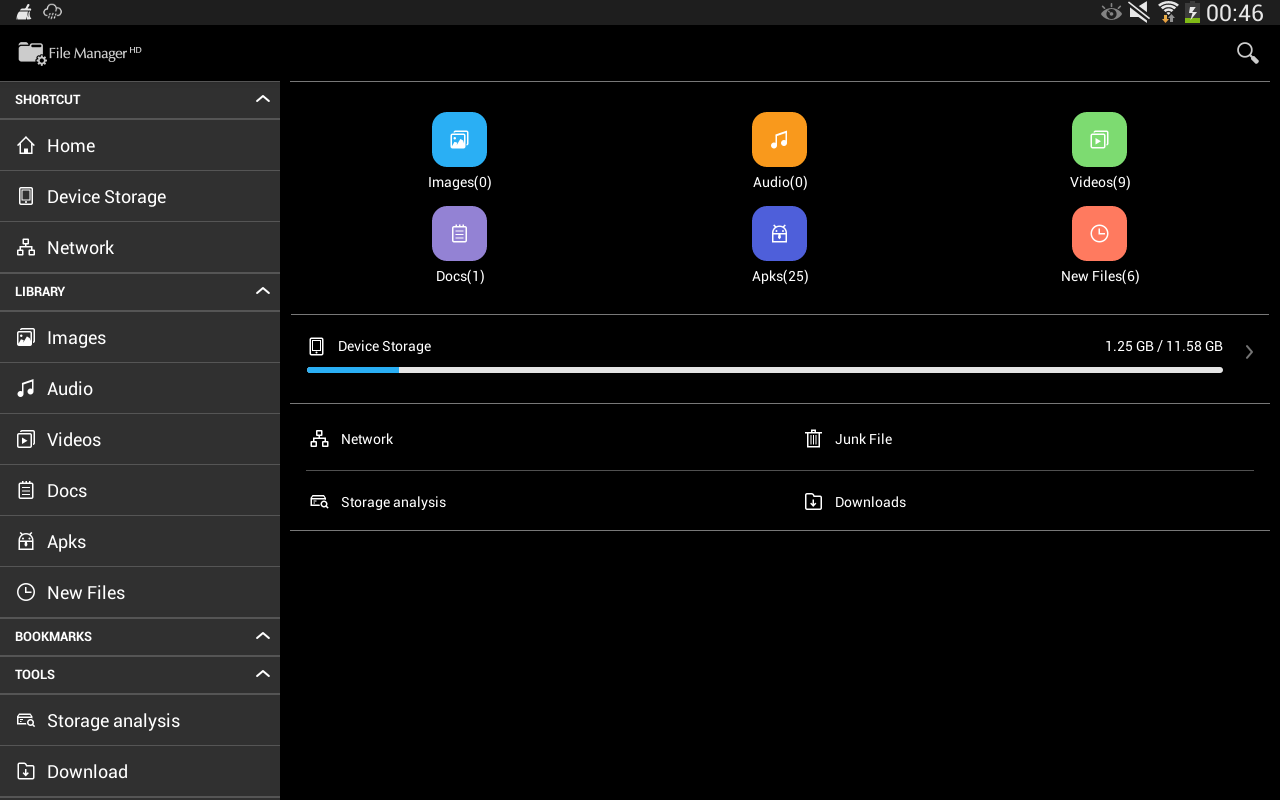
File Manager HD (Explorer) v3.3.0 build 30300216 [Ad-Free]
![File Manager HD (Explorer) v3.3.0 build 30300216 [Ad-Free] File Manager HD (Explorer) apkmania](http://lh3.googleusercontent.com/-xk4OXSMyq10/VT6J7jZ_JcI/AAAAAAAAAOU/h_9mgFdGMSc/File%252520Manager%252520HD%252520%252528Explorer%252529%252520apkmania%25255B2%25255D.png?imgmax=800)
File Manager HD (Explorer) v3.3.0 build 30300216 [Ad-Free]
Requirements: Android Varies with device
File Manager HD is full featured file management tooling for Android, with fresh UI design and user friendly functions.
It is optimized for both phone and tablet devices!
Includes:
* Follow Android latest theme and design guideline.
* Multiple resolution support.
* Elegant icons for 150+ different file types, toolbar and menu items
* Support 28 languages
* Support both light and dark theme
* Cut, copy, paste and cancellable progress dialog
* List and grid view for file explorer
* Compress and decompress support
* Search and share files
* Multiple selection and sorting support
* Thumbnail for photo, pictures and apk files
* Support both local and remote(LAN/SMB) file system
* Support FTP, FTPS, SFTP and WebDAV
* Support cloud storage including Dropbox, Box, Google Drive, SkyDrive, SugarSync, Yandex Disk and Ubuntu One
* Play streaming media from LAN/FTP/WebDAV/Cloud without download
* Support FTP file sharing, access device files freely without data cable
* Support file shortcut on Home screen for easily access
* Built-in text editor, image gallery and swf player
* Fully tested on Nexus5, Xoom, Nexus7 and Nexus10
Supported Languages: English, Arabic, Czech, German, Greek, Spanish, French, Hungarian, Italian, Japanese, Korean, Dutch, Polish, Portuguese, Russian, Slovak, Slovenian, Swedish, Thai, Turkish, Simplified Chinese, Traditional Chinese, Bahasa Indonesia, Hebrew, Finnish, Hindi, Croatian and Serbian
What's New
Version 3.3
- Add remote transfer funtion
- Enhanced app stability and fixed bugs
Google Play
Download File Manager HD (Explorer) v3.3.0 build 30300216 [Ad-Free] Apk or Apk or Apk
Saturday, January 3, 2015
Fast Five the Movie: Official Game HD v1.0.0/v1.0.3/v1.05/v1.0.7/v1.0.9 (All Devices) [Gameloft Store]
![Fast Five the Movie: Official Game HD v1.0.0/v1.0.3/v1.05/v1.0.7/v1.0.9 (All Devices) [Gameloft Store] Fast Five the Movie: Official Game HD v1.0.0/v1.0.3/v1.05/v1.0.7/v1.0.9 (All Devices) [Gameloft Store]](http://lh4.ggpht.com/-xZqVe8ZSJjE/VKbSe0HaruI/AAAAAAAAAMk/7Yv04QeHLUk/Fast%252520Five%252520the%252520Movie%252520Official%252520Game%252520HD%25255B2%25255D.jpg?imgmax=800)
Fast Five the Movie: Official Game HD v1.0.0/v1.0.3/v1.05/v1.0.7/v1.0.9 (All Devices) [Gameloft Store]
Requirements: Android 2.2+
The explosive franchise built on speed is back with Fast Five, and this model comes fully loaded!
Play as Brian O'Conner on the wrong side of the law and assemble an elite team of top racers.
Get behind the wheel of your dream car to battle opponents in the ultimate high-stakes racing game that follows the movie storyline.
Escape hard-nosed federal agent Luke Hobbs by tearing up the streets of Rio de Janeiro, the Dominican Republic, Hong Kong and more!
Get behind the wheel of famous cars from the film, including the latest Dodge Challenger 2011 and Dodge Charger 2011
Discover the unbelievable Rewind Time feature and get a second chance at taking a nasty corner or avoiding a pile-up.
Devastating events during the races: elements of the environment will collapse or explode, changing the track and creating new obstacles!
Impressive realization with fluid animation - even during high speed boosts - and real-time reflection of the roadside on your car.
Intense Multiplayer mode: share the action with your friends or go online in races for up to 10 players!
More Info:
http://www.gameloft.com.au/android-games/fast-5-android/
Download Instructions:
APK:v1.0.0 ARMv6 320x480:
http://www14.zippyshare.com/v/1026506/file.html
v1.0.3 Adreno:
http://www8.zippyshare.com/v/11339908/file.html
v1.05 Mali:
http://www40.zippyshare.com/v/70940723/file.html
v1.05 Tegra:
http://www10.zippyshare.com/v/4162575/file.html
v1.0.7 GalaxyTab:
http://www27.zippyshare.com/v/68624690/file.html
v1.0.9 PowerVR:
http://www35.zippyshare.com/v/16441231/file.html
OBB Torrent:
Adreno:
http://www50.zippyshare.com/v/53777742/file.html
Mali:
http://www50.zippyshare.com/v/40893191/file.html
PowerVR:
http://www50.zippyshare.com/v/98084465/file.html
Tegra:
http://www50.zippyshare.com/v/78155527/file.html
Wednesday, November 26, 2014
Office HD: TextMaker FULL v2.0 Apk

Office HD: TextMaker FULL v2.0
Requirements: 4.0 and up
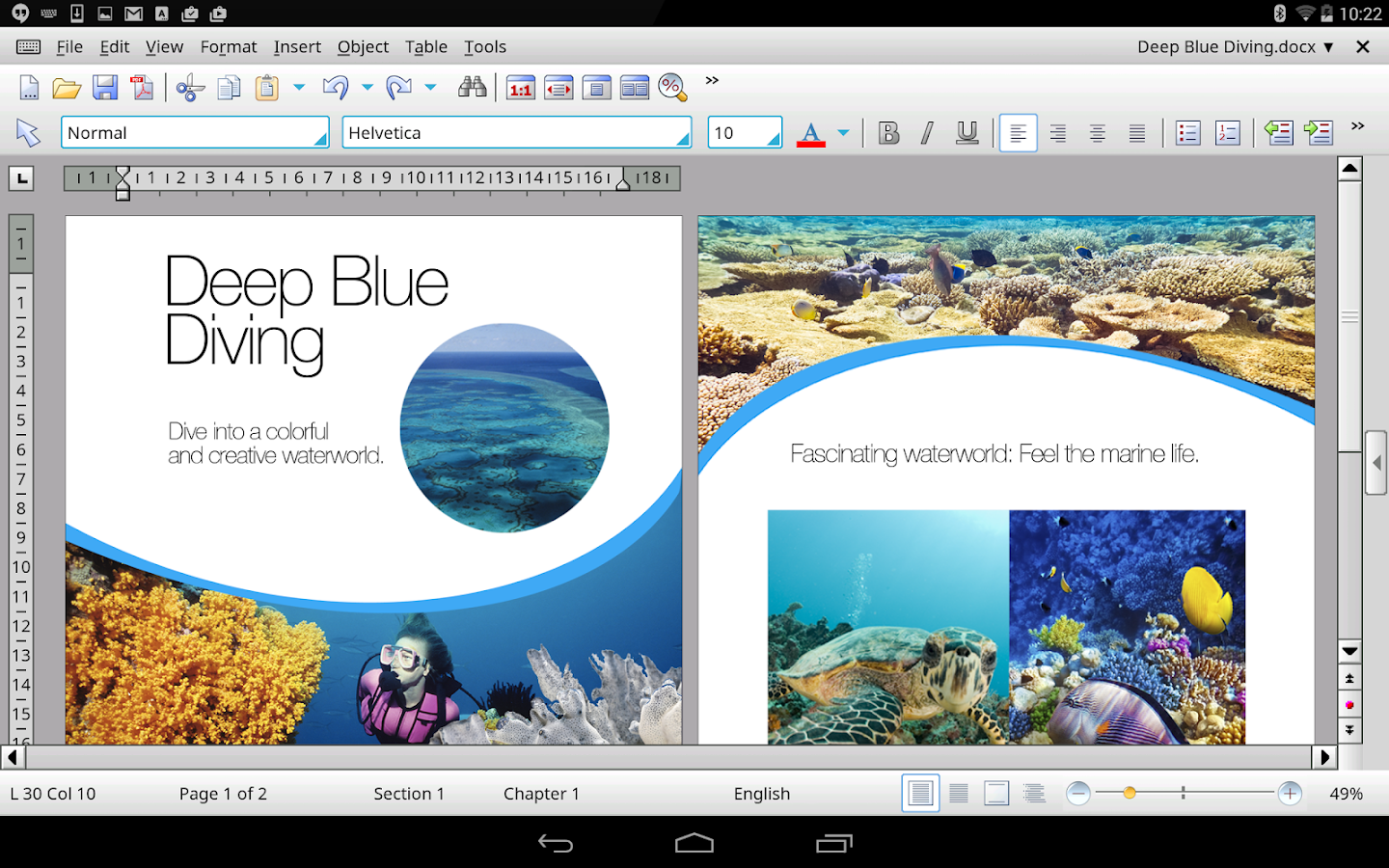
Overview: TextMaker HD is the only complete word processor for tablet computers – the full set of features for editing and formatting documents that you know from your desktop word processor is at your disposal. Finally, you can create and edit documents on your tablet computer like you do on your PC!
Description
What users of Android tablets could only dream of until now is finally a reality.
TextMaker HD is the only complete word processor for tablet computers – the full set of features for editing and formatting documents that you know from your desktop word processor is at your disposal. Finally, you can create and edit documents on your tablet computer like you do on your PC!
Seamless compatibility: TextMaker HD reads and writes DOC and DOCX files from Microsoft Word 6.0 up to Word 2013, including password-protected ones. Additional supported file formats include OpenDocument Text, RTF, HTML, and several more.
Intuitive to use: If you've already worked with TextMaker or Microsoft Word, you'll pick up TextMaker HD for Android in no time. The user interface is just like the one on the PC, but perfectly adapted to touchscreen use.
Save locally or in the cloud: TextMaker HD not only opens and saves documents on your Android tablet, but also in the cloud: Directly from TextMaker HD you can edit documents in Dropbox, Google Drive, Evernote, and OneDrive.
TextMaker HD brings the features of a desktop word processor to your Android tablet. Don't settle for less.
Files and printing
► Open and save DOC and DOCX from Microsoft Word 6.0 to 2013 faithfully to the original, including password-protected files
► Open and save documents in OpenDocument Text, RTF, and HTML formats
► Assistant for import and export of plain-text files
► Create PDF files directly in TextMaker HD
► PDF forms, tagged PDFs
► Printing and mail merge via Google Print and various printing programs in the Google Play store
► Send document by e-mail as DOC, DOCX, or PDF
► Built-in database module, lists & labels
Editing and formatting
► Insert fields, such as date/time, page number, author, consecutive numbers, etc.
► SmartText: for example, type "asap" and "as soon as possible" appears immediately
► Calculations in text and tables
► Borders, shading, fill patterns, drop caps, paragraph control
► Hidden and protected text
► Paragraph and character styles, stylesheet manager
► Automatic numbering of lines, paragraphs, lists, and headings
► True master pages, not just simple headers and footers
Features for complex documents
► Outliner for structuring documents
► "Track changes" tracks all changes made to a document and lets you accept/reject them later
► Comments appear as balloons in the right margin of your pages
► Cross references, footnotes, endnotes, indices, tables of contents, bibliographies
► Captions and tables of figures
► Creation of forms with input fields, checkboxes, dropdown lists, calculations, etc.
Graphics and drawing
► Draw and design directly in your documents, with AutoShapes that are fully compatible with Microsoft Word
► Insert images in a range of formats, both from files and from the Android gallery
► Mirror effects, soft shadows, and transparencies
► Images can be cropped directly in the document
► Change brightness, contrast, and gamma of images directly in TextMaker HD
► Drawings can be filled with solid colors, patterns, images, and gradients
► Wrap text around irregularly shaped graphics
► Large symbols library for flowcharts and org charts
► TextArt feature for type effects
► Insert 70 different types of 2D and 3D charts
Tables
► Nested and multi-page tables
► Cells can be sorted, merged, and rotated
► Repeating headers (headers are automatically automatically repeated at the beginning of every new page)
Language tools
► Spell-check in 17 languages, synonyms in 10 languages, and automatic hyphenation in 33 languages
► Typos are highlighted with a red underline
What's New
Problem with Google Licensing API fixed
This app has no advertisements
Requires Android: 4.0 and up & File Size 18 MB
Google Play
Download Office HD: TextMaker FULL v2.0 Apk
Office HD: Presentations FULL v2.0 Apk

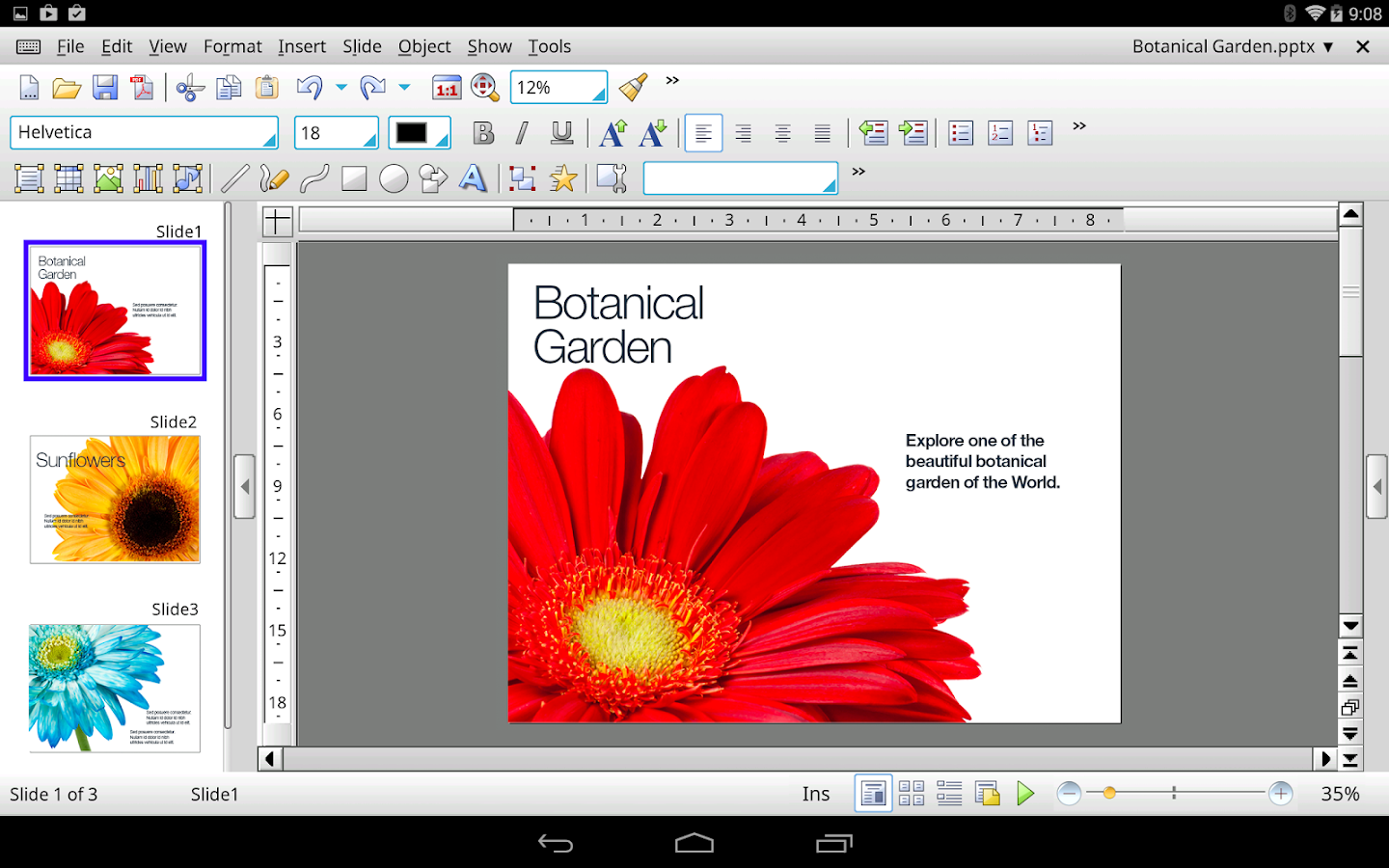
Office HD: Presentations FULL v2.0
Requirements: 4.0 and up
Overview: Presentations HD is the only complete presentation program for tablet computers – the full set of features for editing and formatting presentations that you know from desktop programs such as Microsoft PowerPoint is at your disposal. Finally, you can design slides and present them on your tablet computer like you do on your PC!
Description
What users of Android tablets could only dream of until now is finally a reality.
Presentations HD is the only complete presentation program for tablet computers – the full set of features for editing and formatting presentations that you know from desktop programs such as Microsoft PowerPoint is at your disposal. Finally, you can design slides and present them on your tablet computer like you do on your PC!
Seamless compatibility: Presentations HD reads and writes PPT and PPTX files from Microsoft PowerPoint 97 up to PowerPoint 2013, including password-protected ones.
Intuitive to use: If you've already worked with SoftMaker Presentations or Microsoft PowerPoint, you'll pick up Presentations HD for Android in no time. The user interface is just like the one on the PC, but perfectly adapted to touchscreen use.
Save locally or in the cloud: Presentations HD not only opens and saves documents on your Android tablet, but also in the cloud: Directly from Presentations HD you can edit documents in Dropbox, Google Drive, Evernote, and OneDrive.
Presentations HD brings the features of a desktop presentation program to your Android tablet. Don’t settle for less.
Files and printing
► Open and save PPT and PPTX from Microsoft PowerPoint 97 to 2013 faithfully, including password-protected files
► Printing via Google Print and various printing programs in the Google Play store
► Scale the printout so that it fits on a specified number of pages
► Print and create PDF files with your choice of slides, outlines, handouts, and notes
► Tagged PDFs and bookmarks in PDF files
► Export entire presentations as graphic files or HTML web pages
► Send presentations by e-mail as PPT, PPTX, or PDF
Design
► Numerous attractive design templates do the design work for you
► Each template comes with an array of matching color schemes
► Create your own color schemes and switch between them at the press of a button
► Predefined layouts for flexible slide design
► Universal placeholders that can be filled with text, graphics, or tables
► Sophisticated slide master concept (enables global changes to all slides simultaneously)
► Large selection of graphical bullets
► Insert photo collections
Graphics and drawing
► Comprehensive drawing and image functions: Draw and design directly on the slide
► Insert images, both from files and from the Android gallery
► All AutoShapes compatible with the AutoShapes of PowerPoint 2013
► Mirror effects, soft shadows, and transparencies
► Crop images directly on the slide
► Change brightness, contrast, and gamma of images directly in SoftMaker Presentations HD
► Connector lines between objects
► Large symbols library for flowcharts and org charts
► TextArt feature for amazing type effects
► Insert tables and charts (80 chart types in 2D and 3D)
Animations and slide transitions
► Hundreds of different object and text animations available
► Ready-made animation schemes that animate entire presentations at once
Flexible presentation
► Both user-controlled and automatic presentations without a speaker (kiosk mode)
► Interactive presentation of slide shows with virtual pen and highlighter
► Notes as a memory aid for the speaker
► Handouts for the audience
► Full screen view
Managing and outlining
► Outliner
► Built-in slide sorter lets you manage and arrange slides
► Spell-check in 17 languages, synonyms in ten languages, and automatic hyphenation in 33 languages
What's New
Problem with Google Licensing API fixed
This app has no advertisements
Requires Android: 4.0 and up & File Size 19 MB
Download Office HD: Presentations FULL v2.0 Apk
Office HD: PlanMaker FULL v2.0 Apk
Office HD: PlanMaker FULL v2.0
Requirements: 4.0 and up
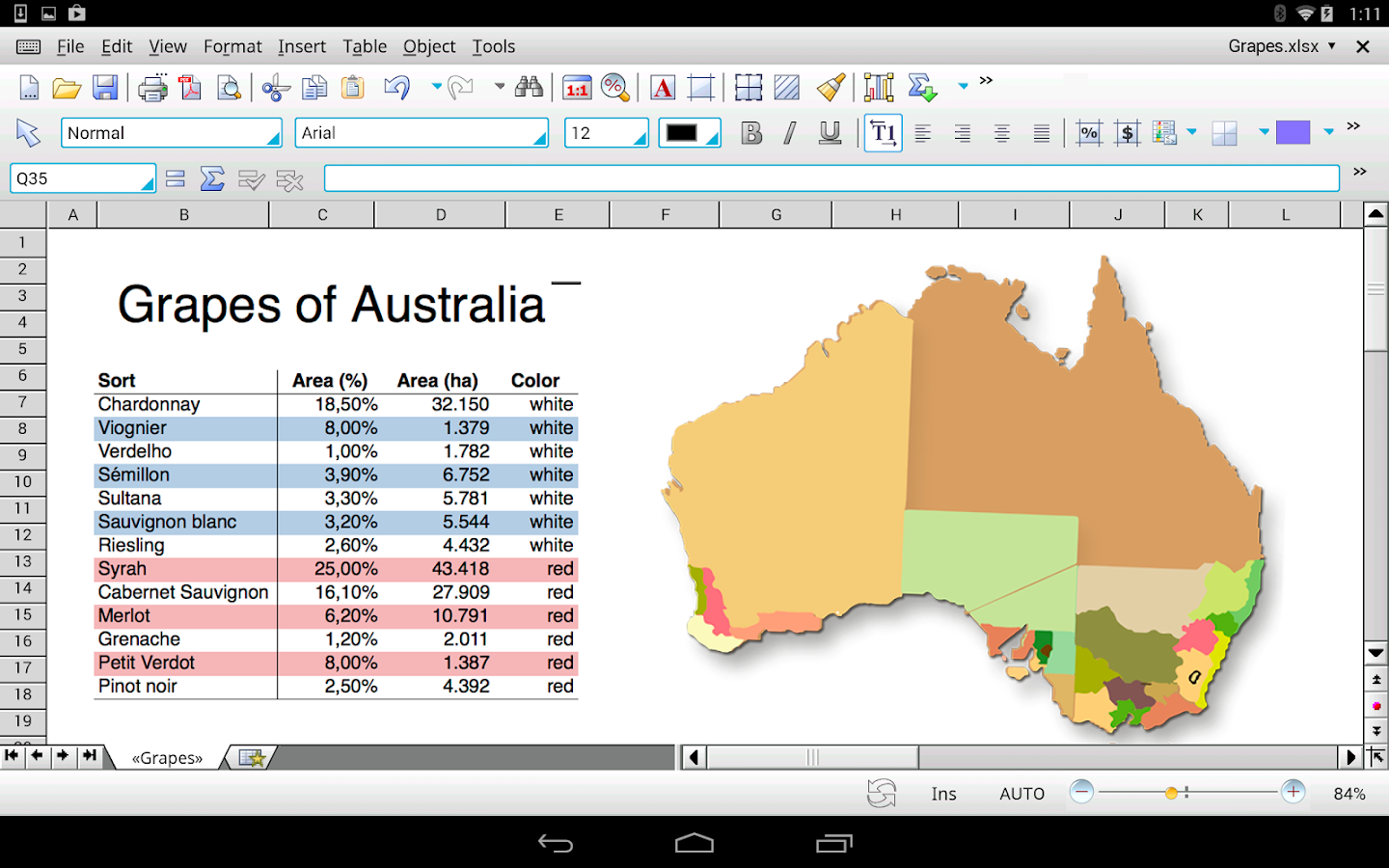
Overview: PlanMaker HD is the only complete spreadsheet program for tablet computers – the full set of features for editing and formatting spreadsheets that you know from your desktop spreadsheet program is at your disposal. Finally, you can calculate, analyze, and present on your tablet computer like you do on your PC!
Description
What users of Android tablets could only dream of until now is finally a reality.
PlanMaker HD is the only complete spreadsheet program for tablet computers – the full set of features for editing and formatting spreadsheets that you know from your desktop spreadsheet program is at your disposal. Finally, you can calculate, analyze, and present on your tablet computer like you do on your PC!
Seamless compatibility: PlanMaker HD reads and writes XLS and XLSX files from Microsoft Excel 5.0 up to Excel 2013, including password-protected ones.
Intuitive to use: If you've already worked with PlanMaker or Excel, you'll pick up PlanMaker HD for Android in no time. The user interface is just like the one on the PC, but perfectly adapted to touchscreen use.
Save locally or in the cloud: PlanMaker HD not only opens and saves documents on your Android tablet, but also in the cloud: Directly from PlanMaker HD you can edit documents in Dropbox, Google Drive, Evernote, and OneDrive.
PlanMaker HD brings the features of a desktop spreadsheet program to your Android tablet. Don't settle for less.
Files and printing
► Open and save XLS and XLSX from Excel 5.0 to 2013 faithfully to the original, including password-protected files
► Import and export assistant for text files and dBASE databases
► Create PDF files (including tagged PDFs) directly in PlanMaker HD
► Print via Google Print and various printing programs in the Google Play store
► Scale the printout so that it fits on a specified number of pages
► Send worksheets by e-mail as XLS, XLSX, or PDF
Comprehensive calculation capabilities
► More than 330 calculation functions
► Worksheets with 1 million rows and 16,384 columns
► Supports complex numbers and array functions
► Perpetual time format (20:00 + 5:00 is not 1:00 but 25:00)
► Calculate with negative times
► External references (calculations that access data in other files)
Edit worksheets
► Freeze rows and columns
► Comments
► Syntax highlighting
► Formula auditing helps to troubleshoot worksheets
► Input validation (data validation)
► Sheet, workbook and document protection with encryption
► Spell checking in 17 and hyphenation in 33 languages
Analyzing data
► With pivot tables you can display data in a targeted way according to your individual specifications, summarize, sort into categories, compare and evaluate.
► AutoFilter
► Goal seeker
► Scenarios
► Create database ranges within worksheets
► Data grouping (outliner)
► Sort by up to 64 columns
► Transpose cell ranges
Creating attractive worksheets
► Cell and character styles
► Conditional formatting like in Excel 2013
► AutoFormat, borders, shading, fills
► Rotate and merge cells
► Center across columns
► Forms with input fields, checkboxes, dropdown lists, etc.
► Headers and footers
► Colored tabs for worksheets
Graphics and drawing
► Draw and design directly in the worksheet using AutoShapes, freehand drawings, and pictures
► Insert images in a range of formats, both from files and from the Android gallery
► Mirror effects, soft shadows, and transparencies
► Images can be cropped directly in the worksheet
► Change brightness, contrast, and gamma of images directly in PlanMaker HD
► Connector lines between objects
► Large symbols library for flowcharts and org charts
► TextArt module for type effects
Present and visualize data
► 80 Excel-compatible chart types in 2D and 3D
► Impressive special effects in charts: soft shadows, bevels, transparency, light sources, etc.
What's New
Fixed problem with Google Licensing
This app has no advertisements
Requires Android: 4.0 and up & File Size 18 MB
Google Play
Download Office HD: PlanMaker FULL v2.0 Apk
Thursday, November 20, 2014
OfficeSuite 8 + PDF Converter (PDF & HD) v8.0.2421
The world’s No. 1 mobile office editor for Android is now FREE.
OFFICESUITE 8 OUT NOW! WITH THIS MAJOR UPDATE YOU GET:
• Completely new desktop similar user interface and experience to help you easily switch working on your mobile device
• Track changes (Premium feature)
• PDF security and editing features (digital signatures, permissions management, add text to PDF, annotations)
• More
The only office solution allowing you to convert PDF files to Word, Excel or ePUB (available in OfficeSuite Premium).
PCMAG EDITOR'S CHOICE AND GOOGLE PLAY EDITOR’S CHOICE MOBILE OFFICE
OfficeSuite is the trusted leader for reliably editing Microsoft Office and PDF documents and attachment on Android.
• Installed on over 160 million devices in 205 countries
• Over 55,000 registrations per day
• No. 1 app in Google Play Business category
• 45 million downloads and over 300,000 reviews on Google Play
KEY FEATURES:
•Ability to view, create and edit complex Microsoft Office and PDF files and attachments with a single complete feature-rich application.
•Full compatibility with Microsoft formats DOC, DOCX, DOCM, , XLS, XLSX, XLSM, PPT, PPTX, PPS, PPSX, PPTM, PPSM and support of common formats as PDF, RTF, TXT, LOG, CSV, EML, ZIP; Open Office formats available as in-app purchase – ODT, ODS and ODP in OfficeSuite Premium.
•Intact document formatting and layout and ability to create advanced documents on the device.
•Rich editing features for advanced document creation and touch-up on the device.
•Easy file access to local, remote files and email attachment.
•Integrated File Browser allowing you to access and manage your local and remote storage files; Quick access to Recent files, My documents folders and document templates.
•Sharing via could, email, Bluetooth, Wi-Fi Direct.
•Integration with various cloud services as Box, DropBox, Google Drive, OneDrive, Amazon Cloud Drive and SugarSync.
•Security features - work with password protected files (available in OfficeSuite Premium).
•Spell checker, predictive text keyboard, PDF camera scanner, Microsoft compatibility Font Pack and many more features available as in-app upgrade to OfficeSuite Premium.
•Save to PDF (in OfficeSuite Premium). Convert PDF files to Word, Excel or ePUB (available in OfficeSuite Premium)
•Available in 56 languages.
•Optimized for work with keyboards with support of multiple keyboard shortcuts and moving of objects and selections.
A number of manufacturers such as Sony, Amazon, ACER, Alcatel, Toshiba, Sharp, Barnes and Noble, Archos, Polaroid, ViewSonic, Kyocera and Kobo trusted MobiSystems and preloaded OfficeSuite worldwide.
What's New
VERSION 8.0.2421:
•Amazon Cloud Drive support
•New font spinner for managing and adding fonts in Word and PowerPoint
•New desktop similar user interface and experience
•PhotoSuite integrated in OfficeSuite
•Word module:
•Track changes (for Premium)
•Page color support
•Excel module - additional font support
•PowerPoint module - text formatting
•PDF module:
•Permissions management: user password, owner password, printing and annotations
•Digital signatures and signature profiles


Require 4.0 and Up & File Size 33 MB
GOOGLE PLAY
Download OfficeSuite 8 + PDF Converter (PDF & HD) v8.0.2421 Apk or Apk
Saturday, September 20, 2014
Premium Wallpapers HD Premium v2.5.7
Premium Wallpapers HD and Backgrounds HD is a collection of the best full HD wallpapers and backgrounds for your smartphone or tablet. All our wallpapers have been personally selected so you can personalize your smartphone.
A modern but simple UI is used so you can easily navigate between categories. We hope it will make it easy to get to the wallpapers you want. Also in Premium Wallpapers HD (Backgrounds HD) you have the opportunity to favorite the wallpapers you like most along with users all over the world, making your favorite wallpapers rise to the top!
Features:
✔ More than 10,000 wallpapers in HD quality.
✔ Wallpaper sorted by 25+ categories.
✔ New wallpapers and images every day.
✔ Only HD quality.
✔ Save wallpapers on your SD card.
✔ The high speed of the application.
✔ Stylish interface.
✔ Ability to automatically change wallpaper
______________
User reviews
**Melissa Ross**
Great apo Great app, nice HD wallpapers ♥♥♥♥♥
**Jim Powell**
Excellent app! Lots categories to browse and plenty of beautiful wallpapers to choose from.
**Gerhard Steyn**
STUNNING!!! Thank you SOOO MUCH, Beautiful
What's New
2.5.6
- fix widget
- update UI
- bug fixes
Require 2.2 and Up & File Size 4.1 MB
GOOGLE PLAY
Download Premium Wallpapers HD Premium v2.5.7 Apk
Labels:
Android,
APK,
apps,
HD,
live wallpapers,
Personalization,
Premium
Subscribe to:
Posts (Atom)